- Getting started
- Splits and two amps
- Your library and songs
- Setlists
- Stage
- Foot controller
- Audio
- The plugin
- Account, credits and plans
- Troubleshooting
Getting started
Sign in with TONE3000. It is free, it is where the captures come from, and it is what carries your library and your plan between your phone, your tablet and the plugin.
Plug in
To play through it you need an audio interface, and any USB one will do. If you don’t have one, the iRig HD X or the iRig USB is the cheap and obvious choice, and either one works well. Guitar into the interface, interface into the device, headphones out of the interface. Then tap Plug In: that opens the audio device, and you should hear yourself right away.
The Amazon links on this page are affiliate links. As an Amazon Associate we earn from qualifying purchases, at no extra cost to you.
The board
What you play through is a signal chain: a row of blocks in the order the signal meets them — pedals, then the amp, then the cab and whatever sits after it. Some blocks are ordinary effects. The amp and drive blocks are neural captures: recordings of how one real piece of gear behaves, made by people and hosted on TONE3000. Tap a block to bypass it, open it for its controls, or swap its capture for a different one.
To change the order, move the blocks. On a phone the chain is a vertical rack: drag a block by its ⠿ grip. On a tablet, or a phone turned on its side, it is a signal-flow view: press and hold a block, then drag it where you want it. Android works the same way.
Name a song
Type an artist and a song. CAPO — the part of ManifesTone that builds rigs — reads what is known about that record, picks the captures, puts the chain in the right order, sets the controls and tells you why it chose what it chose. Then you play. If it is not quite the sound in your head, say so in plain words and it adjusts.
Tone credits
Every rig carries a TONE CREDITS sheet: each capture in the chain, who made it and under what license. Copy it in one tap and paste it into your video description or your liner notes. The people who made these captures gave them away; crediting them costs you nothing.
Splits and two amps
A chain does not have to be one line. A split runs two paths side by side and joins them again at a Mix: a dry lane and a wet delay-and-reverb lane, say, or two different amps. The Mix blends the two, spreads or pans them across the stereo field, and lines them up in time so they sum cleanly.
Make a split
Long-press the block the split should start after and choose Split here. Then drag blocks into lane A or lane B; whatever sits after the Mix hears what it puts out.
A, Both, B
The path control on the Mix chooses what you hear: A, Both or B. Live, switch 1 on your foot controller flips between A and B. A saved rig remembers which path it starts on, so a song can open on the clean lane and leave the dirty one a stomp away.
Two amps
Put an amp in each lane and you have a dual-amp rig — a clean amp and a dirty one, or two voices blended into one. Two amps take more processing than one, so the option is there on devices that pass a quick performance check, and CAPO only offers it on those.
Ask CAPO for one
CAPO builds splits too. Ask for a wet/dry rig, or a clean and a dirty amp, and it lays out the lanes for you. For a Whole song rig whose parts need different amps, it puts each part’s amp on its own path and loads on path A; switch 1 flips to the other part’s amp.
Your library and songs
Save a rig and it lands in your library, filed under the artist and the song rather than under a name you have to invent. Search by either.
Parts
One song usually needs more than one sound. A part — clean, rhythm, lead — is its own rig saved against the same song. The library shows them as a single row with a chip per part, so a song stays one thing in the list no matter how many sounds it takes. Tap a chip to load that part.
To mark an existing rig as a part, either long-press its chip in Stage and choose Mark this rig as, or set the part in the save sheet when you save it. A rig with no part set is the full song.
Previous and Next always move by song and never between parts — so a stray stomp mid-song cannot drop you into the wrong verse. Parts are changed with the chips, or with a footswitch: by default, hold switch 4 for the next part.
Setlists
A setlist is one row per song, in the order you will play them. Adding a song adds the song; adding a chip pins one specific part, which is what you want when a song only ever gets played clean.
Press Play on the set and it opens Stage at the first song. From then on Previous and Next walk the set rather than your library. To jump, tap the song pill and pick any song in the set.
Stage
Stage is the full-screen view for playing: no lists, no menus, nothing to read. Open it from the play button in the header, or by playing a setlist.
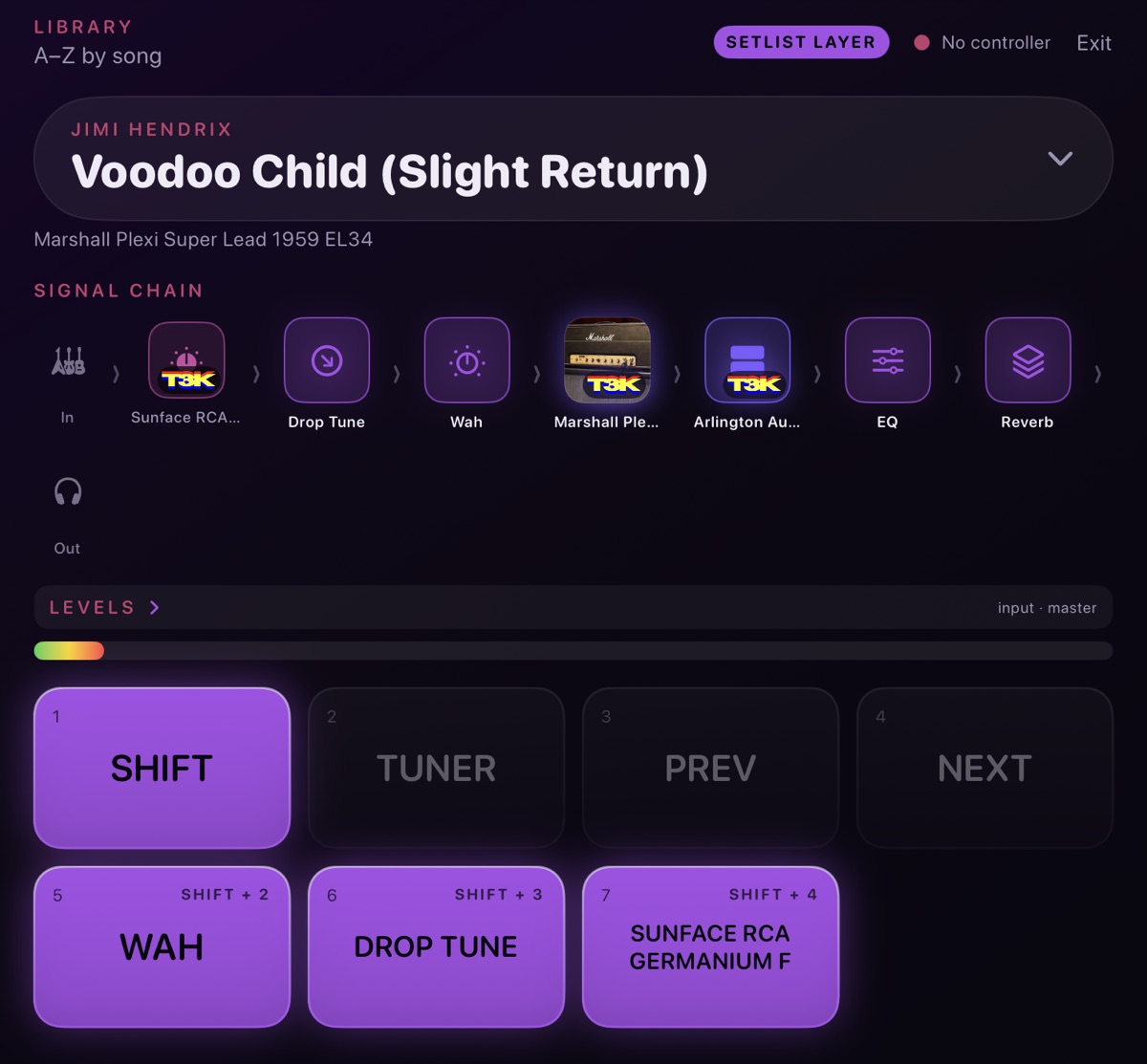
What is on screen:
- The song pill at the top — the artist and song you are on. Tap it to pick another; it is also where Exit lives.
- Part chips beneath it. Tap to switch part; long-press for the part menu, including Bind to a footswitch.
- The signal chain. Tap a block or a capture pedal to bypass it. Long-press one for Settings or Bind to a footswitch.
- LEVELS, a fold you open when you need input and output, and ignore when you do not.
- The footswitches along the bottom, one per switch, showing what your foot controller does on this rig right now: the tap job big on each switch’s strip, its hold job underneath, and a ring that lights while the job is on. Tap a switch for its tap job; long-press it for its hold job. While Shift is on, a SHIFT · PAGE badge sits over them. You can work the whole rig with a finger before a pedal is anywhere near it.
Stage plugs in on its own: open it and it opens the audio device for you. The tuner is silent — it mutes your output and lays a tuner over the screen, so you can tune between songs without the room hearing it. Leave with Exit, top right.
Foot controller
Pairing
For a Bluetooth MIDI pedal: Settings › Foot controller › Scan, then pick it from the list. A BLE pedal only advertises while it is not connected to anything else, so if it does not appear, disconnect it from the laptop or the other tablet first. Once paired, the app reconnects that controller when it opens, and it only goes looking while audio is off — scanning never interrupts your sound. A USB controller needs no pairing: plug it in.
Tap and hold
Every switch has two jobs: a tap and a hold. Press and let go for the tap; keep your foot down for about a third of a second and the hold fires while the switch is still down. A switch with no hold job fires the moment you press it, so a stomp never waits. The one mode is Shift, below.
On a four-switch board — a Morningstar, or an M-VAVE Chocolate and the boxes like it (affiliate link) — you start from this layout:
- 1 — tap flips between path A and B on a split rig; hold to play both paths at once
- 2 — tap is Shift; hold for the tuner, silent: it mutes the output and shows the tuner
- 3 — tap for the previous song
- 4 — tap for the next song; hold for the next part
It is a starting point, not a rule: every tap and every hold can be given a different job.
Shift
Tap Shift and the other switches become this rig’s pedals: its TONE3000 pedals first, then any delay, reverb, chorus, phaser, flanger, tremolo, octave or wah on the board, in chain order. Tap one to turn it on or off; its ring lights while it is on. If the rig has more pedals than switches, tap Shift again for the next page; after the last page, Shift turns off. It stays on until you shift back — stomping a pedal does not drop you out — and every hold keeps its usual job. Stage shows SHIFT · PAGE 1/2 over the switches while it is on.
Learning a switch
In Settings › Foot controller, press Learn next to a switch, then press the switch on your board and release it. The app works out what kind of switch it is: a momentary switch, which sends one message going down and another coming up, does both tap and hold; a latching switch, which sends one message per press, does taps only.
Coming from an older version? Your maps carry over on their own. If you never gave switch 2 a tap, it becomes Shift; anything you set up yourself stays where you put it.
Assigning switches
Two ways in, both leading to the same map:
- In the chain, long-press a block and choose Assign a footswitch, then pick the switch and Tap or Hold. In Stage, long-press a block, a capture pedal or a part chip and choose Bind to a footswitch.
- Or go to Settings › Foot controller, pick a switch and choose its tap and hold jobs: block on/off, capture pedal, path A/B, both paths, Shift, next part, switch to clean, rhythm or lead, next or previous song, or tuner.
Switch maps save with the rig, per controller — the same song can sit one way on the board at home and another on the one that lives in the case. The parts of a song share a map, so the wah stays on the same switch whether you are on the clean part or the lead.
Setting up an M-VAVE Chocolate Plus
For tap and hold, each switch has to send one message when it goes down and another when it comes back up. Set that up in M-VAVE’s free MidiSuite app — MidiSuite, not CubeSuite:
- Open Advanced Custom Mode.
- For each switch, set Working mode to Press / release (2 banks).
- Fill in Bank A (press) and Bank B (release) from the table below. Every message is on channel 1 and is a CC.
- Set Max Group Count to 1.
| Switch | Bank A — press | Bank B — release |
|---|---|---|
| A | CH 1 · CC · Data1 20 · Data2 127 | CH 1 · CC · Data1 20 · Data2 0 |
| B | CH 1 · CC · Data1 21 · Data2 127 | CH 1 · CC · Data1 21 · Data2 0 |
| C | CH 1 · CC · Data1 22 · Data2 127 | CH 1 · CC · Data1 22 · Data2 0 |
| D | CH 1 · CC · Data1 23 · Data2 127 | CH 1 · CC · Data1 23 · Data2 0 |
The release message goes in Bank B. Put both messages in Bank A and the switch never reports letting go, so there is no hold.
Then, back in ManifesTone, pair the pedal if you have not already and Learn all four switches again. Each should now read Momentary — tap and hold both work.
Program Change mode works too, for taps only: it sends nothing when you let go, so a hold can never fire. And leave the pedal’s own long-press modes alone — they make the pedal wait before it sends anything, which delays every tap.
Audio
Latency is the gap between the string moving and the speaker moving. It comes from the buffer the device processes audio in: smaller buffer, less delay, more work per second. ManifesTone picks a sensible default for your device.
Lowest latency (exclusive audio), in Settings › Audio, hands the audio device to ManifesTone alone and gets you the tightest the hardware can do. It is off by default, because the shared mode it replaces lets other apps keep making sound — backing tracks, a video you are learning from.
If the input goes silent, unplug the interface and plug it back in, or press Plug In again. If it is still dead, close whatever else is holding the microphone: the camera app will take the input the moment it opens and will not hand it back.
The plugin
ManifesTone is also a VST3 for Linux, macOS and Windows. Same engine, same captures, same library and the same account, so a rig you built on your phone in the room is on the track when you sit down at the desk.
Your foot controller works there too. In a DAW the host owns MIDI, so route the controller to the plugin through the track’s MIDI input; the plugin answers its control changes and program changes with the same tap and hold jobs as the app. Splits are there as well, with the same A · Both · B path control. Anything else you map, automate and switch from the DAW as you would with any other plugin.
Account, credits and plans
One account covers iPhone, iPad, Android and the plugin — buy anywhere, and the plan follows you everywhere. The plugin is not a separate purchase.
What you spend is credits, and building a rig is what spends them. Current plans, prices and credit packs are on the pricing section, and your own balance, billing and subscription live in your account.
Bring your own key
If you have an Anthropic API key of your own, sign in and put it in Settings: rig builds then run on your account rather than spending credits, with no monthly cap from us and fair-use rate limits instead.
Your plan covers three separate limits — builds a month, guitars on file, and saved rigs. A key of your own takes over the first, and from your first build on that key the third comes off too: your saved rig library is uncapped, and still syncs across your devices.
Guitars are the one limit a key does not touch. Your arsenal is sent with every build, so it costs on every build, whoever is paying — the free plan keeps one guitar on file no matter whose key it is, and raising that is what a subscription is for.
The key is held in your device's keychain and passed through to Anthropic at build time; it is never stored, cached or logged on our side. Available on iPhone, iPad, Android and in the plugin.
Troubleshooting
No sound, or the input dropped out mid-song.
Press Plug In again — that reopens the audio device and fixes most of it. If not, unplug the interface and plug it back in. Then check nothing else has taken the microphone; the camera app is the usual culprit. Last, check the interface's own gain, and that your headphones are in the interface rather than in the phone.
The app cannot find my pedal.
A Bluetooth MIDI pedal only advertises itself when it is not connected to something else, so disconnect it from your laptop or other tablet — including in that machine's own Bluetooth settings — and scan again. The foot-controller screen pauses audio while it is open, so scanning cannot interrupt your sound. If it is still missing, power-cycle the pedal.
A switch does nothing.
A few things to check, in order. Has the switch been learned? Each switch needs one Learn. Has it been given a job on this rig — and is the one you want its tap or its hold? Switch maps save with the rig, per controller, so a map you built for one board will not appear when you play through another. And if it is switch 1’s tap: flipping between path A and B only does something on a rig with a split.
Taps work, but holding a switch does nothing.
A hold needs a switch that reports letting go as well as going down. Look at what the foot-controller screen says under the switch: if it is latching, or your pedal is sending program changes, every press is a tap. Set the pedal to send a message on press and another on release, then Learn the switch again, pressing and releasing it. On an M-VAVE Chocolate Plus, follow the setup above.
"Next" stopped working after a reload.
Reinstalling the app clears the learned switches, since they belong to the install rather than to the rig. Go to Settings › Foot controller and Learn your switches again, pressing and releasing each one. Your rigs, parts and switch assignments are untouched.
Two parts of the same song both say "Full song."
Neither has been marked as a part. They are already one song -- that is why they sit together -- but the chips have nothing to call them, so they fall back to the rig names. Load each one, long-press its chip in Stage and choose Mark this rig as — clean, rhythm or lead — or set the part in the save sheet. Once each has its own part, the chips read Clean, Rhythm, Lead.
Still stuck
Ask on Discord or read the support page and FAQ. Naming your device, interface and foot controller saves a round trip.